Skipping VPN TUN for Antigravity IDE on Windows with ProxyBridge Per-Process Proxying
When using Antigravity IDE on Windows, you don't need to enable VPN TUN mode. ProxyBridge can proxy a specific process instead. Just configure a SOCKS5 proxy and proxy Antigravity.exe and language_server.exe, and AI chat, Google OAuth, and Code Assist will connect normally without affecting other apps on the system.
1. Background
Antigravity IDE is built on an Electron architecture, and its AI capabilities depend on the Google Cloud Code Assist backend.
Many users on Windows run into this:
- The browser can reach Google
- Antigravity works once the VPN is in TUN mode
- After turning TUN off:
- Login fails
- The AI chat window cannot connect
- The model list fails to load
For example:
Language Server:
failed to get model infos from API server

oauth2.googleapis.com/token

connectex:
A connection attempt failed
The reason:
Not all network requests from Antigravity are made by the main process.
The actual structure:
Antigravity.exe
        |
        |
        +---- Electron UI
        |
        +---- language_server.exe
                    |
                    |
                    +---- Google Code Assist API
                    |
                    +---- OAuth API
The ones that actually reach:
oauth2.googleapis.com

daily-cloudcode-pa.googleapis.com

cloudcode-pa.googleapis.com
are:
language_server.exeSo:
Proxying only:
Antigravity.exeis not enough.
2. The Approach
The traditional approach:
Windows
 |
VPN
 |
TUN mode
 |
All traffic proxied
Drawbacks:
- Domestic Chinese sites also go through the proxy
- Games are affected
- Latency increases
- DNS changes
This tutorial’s approach:
Antigravity.exe
        |
        |
ProxyBridge
        |
        |
SOCKS5 proxy
        |
        |
Clash / sing-box / v2ray
Only Antigravity goes through the proxy.
Other software:
Browser
Games
WeChat
Download tools

↓

Direct connection
3. Preparation
1. Prepare a SOCKS5 proxy
You need a local SOCKS5 service.
For example:
Clash:
Open:
SettingsEnable:
Socks PortFor example:
127.0.0.1:7890Or:
sing-box:
127.0.0.1:1080Test:
CMD:
curl --socks5 127.0.0.1:7890 https://www.google.comAs long as it returns content, you are good.
4. Install ProxyBridge
Project URL:
https://github.com/InterceptSuite/ProxyBridge
Go to:
ReleasesDownload the Windows version.
After installing:
Recommended:
Right-click:
ProxyBridge.exe

↓

Run as Administrator
Reason:
ProxyBridge depends internally on:
WinDivertwhich requires administrator privileges.
5. Configure the Proxy
Open ProxyBridge.
Go to:
Proxy SettingsAdd:
Type:
SOCKS5Address:
127.0.0.1Port:
10808For example:
Protocol:
SOCKS5
Host:
127.0.0.1
Port:
10808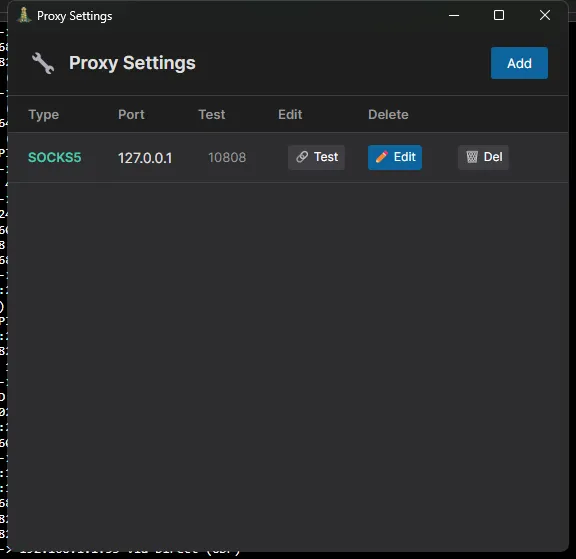 Save.
6. Find the Antigravity Subprocess
This is the most critical step.
Open:
Task Manager
Go to:
DetailsStart Antigravity.
You will see:
Antigravity.exe
language_server_windows_x64.exe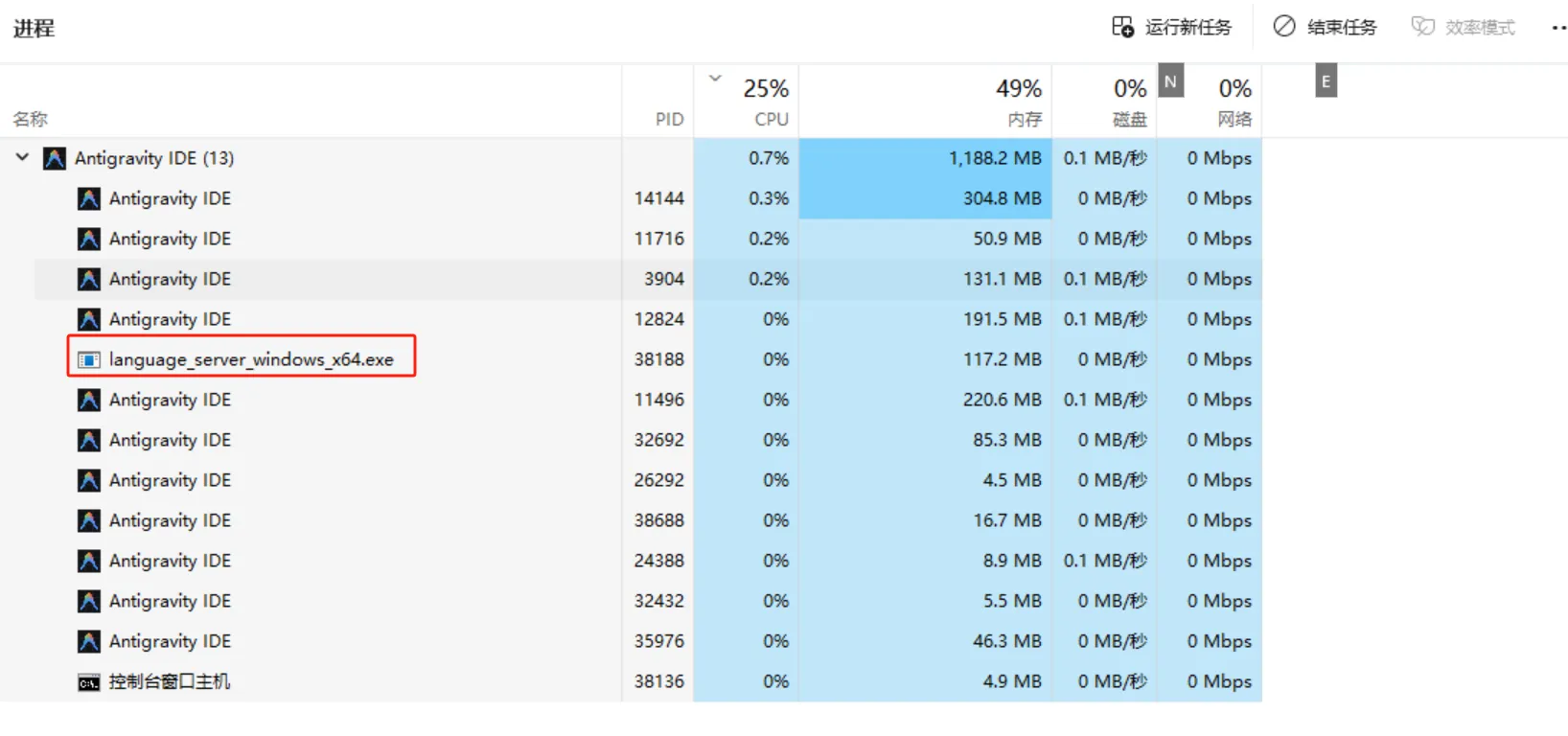 right-click Properties and find the exact directories of these two processes
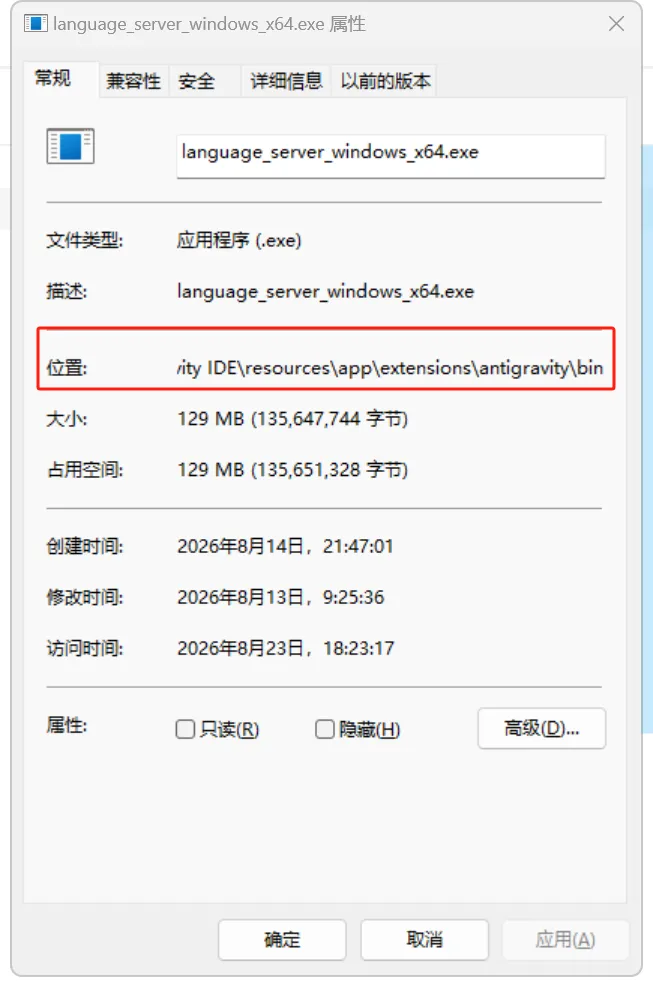 Key point:
You must proxy language_server_windows_x64.exe, otherwise:
AI chat will still fail.
7. Add a ProxyBridge Rule
Go to:
Proxy Rules

↓

Add Rule
In Applications, enter the full directory, e.g. C:\Users\xxxx\AppData\Local\Programs\Antigravity IDE. Note that both file names must be entered.
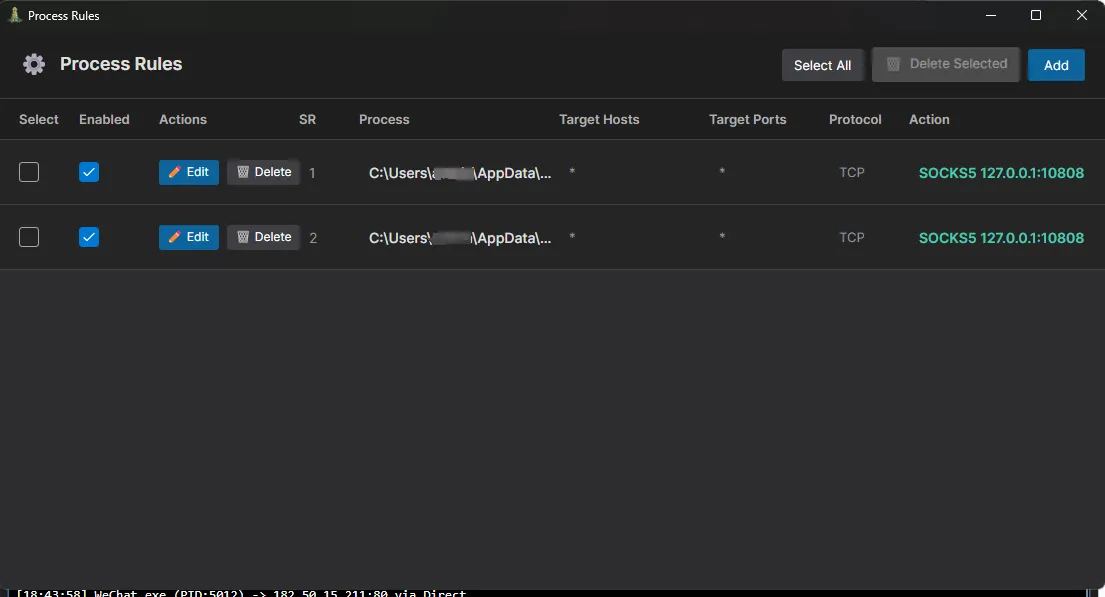 ---
8. Restart Antigravity
Exit completely:
Do not just close the window.
Confirm in Task Manager:
Antigravity.exe

language_server.exe
all ended.
Reopen it.
9. Verify Success
Method 1: Check the ProxyBridge Log
You should see:
language_server.exe

CONNECT

oauth2.googleapis.com:443

PROXY
If you see:
DIRECTit means no rule matched.
Method 2: Check the AI Chat
Signs of success:
Before:
Failed to get model infos

loadCodeAssist failed
becomes:
loadCodeAssist successThen:
- The model list appears
- AI Chat works
- Gemini replies normally
10. Common Issues
1. Login succeeds but AI chat fails
Reason:
Only this was proxied:
Antigravity.exeFix:
Add:
language_server.exe2. Cannot find language_server.exe
Search:
Windows File Explorer:
language_server.exeOr:
PowerShell:
Get-Process | findstr Antigravity3. Google OAuth fails
Add proxy rules:
accounts.google.com

oauth2.googleapis.com

*.googleapis.com

*.cloudcode-pa.googleapis.com
4. Updates fail
Add:
updater.exeto the proxy.
11. Why Not Use TUN?
TUN:
Entire Windows network
        |
        |
       VPN
ProxyBridge:
Specified process
        |
        |
       VPN proxy
Advantages:
| TUN | ProxyBridge | |
|---|---|---|
| Global proxy | ✅ | ❌ |
| Per-app proxy | ❌ | ✅ |
| Game impact | Possible | None |
| Domestic access | Possibly slower | Normal |
| Resource usage | Higher | Low |
| Rule control | Average | Strong |
Comments